Because CSS is meant to separate styling from the structure of a web page, what better way to keep CSS away from the HTML code, than to put it in its own file? As it turns out, you can do just that with any text-editing software, except of course, you save it with a .css file extension. Let's review the three ways to apply CSS to your HTML.

- Inline Styling: This form of styling is used in your HTML, on the same line as the HTML element you're styling.
- Style Tag: This tag is placed at the top of your HTML page inside the head-tag, and it allows you to consolidate any repeat styles you have on your page.
- Style Sheet: This is a separate CSS document that is linked to your HTML page. It applies global styling to any page it's linked to.
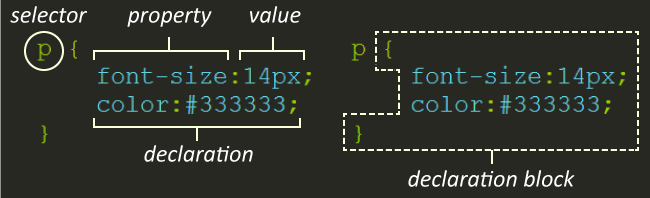
An external CSS file is created with the same formatting as an internal style sheet. Each CSS styling rule is comprised of a selector and its declaration block. The declaration block is designated by opening and closing curly braces { and }, which contain the selector's declarations—its property and value pairings.
When external CSS files are used, you can apply an established set of rules to any of your HTML files that you choose. And any edits made to the CSS file will then cascade to every web page that references the file, making sweeping changes even easier. This also drastically cuts down on the amount of code needed on each page if the pages are all going to be sharing many of the same rules, anyway.
Throughout this lesson, we'll discuss how to connect an external CSS file to an HTML file, how to organize your CSS files, and what cautionary measures to take when writing CSS rules that will be shared by multiple web pages.
