While the strategies we've covered will certainly help in optimizing your visibility with search engines, the most important step happens at the very beginning of the web design process. As previously mentioned, you should make decisions about who will be visiting your site, how the site will be organized, and what design elements will recur to create consistency before any coding begins.

The way you organize the content on a website is called information architecture. Like an architect creating blueprints for a building, you should plan what will appear on each page of your website and what elements will carry over from page to page to create a pleasing sense of unity for visitors. While you can change these aspects of your website after you create it, revisions can be quite challenging on larger projects, so you should keep usability and SEO in mind as you're designing the site.
Below are the design and "architectural" elements that should be considered when determining your site's information architecture.
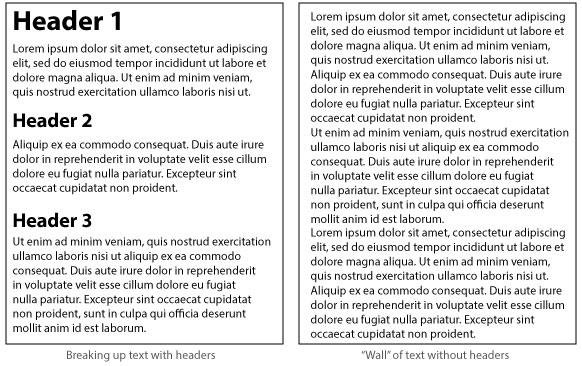
If a visitor encounters a "wall" of text on your site, they are likely to leave before even beginning to read. In the online context, readability means the ability to read content quickly—to scan it, in fact. And one of the best aids to a reader trying to scan text is the heading-tag.
Using headings strategically helps break up your content into more manageable "chunks" while also showing visitors, briefly, what is covered on the page. (The algorithms used by search engines typically favor keywords that appear in heading tags.)
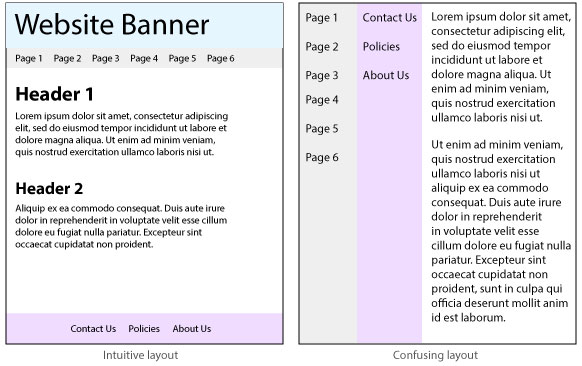
The way you arrange elements on a page can help a visitor grasp what the page is about and what information it contains. This is exactly what Internet users want to see, and most have learned to expect it—they won't dwell on your site long if they have to work (think) very hard to understand what a page is about.
You can help users by using font sizes and types that are easy to read, using bold type and colors sparingly, including lots of empty "white space" around important elements, and organizing content visually, with tabs, tables, rollover elements, and dropdowns.
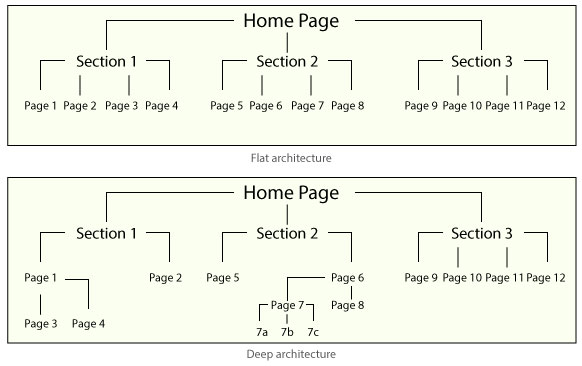
The links that visitors use to navigate, or move around in, your website are the visible results of the site's information architecture. And architecture is something you decide at the very beginning of a web design project. In general, a "flat" site architecture makes content much easier for a user to find. It also makes content easier for a search engine to identify as it "crawls" through the site looking for possible keywords. If it finds these in the "top" levels of the architecture, it gives the site higher priority for searchers looking for those search terms.
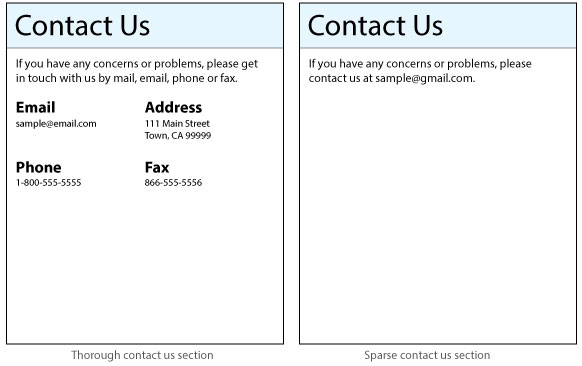
As you probably know from your own web surfing, especially if you look for local businesses or services online, a Contact page is not only helpful but also reassuring. For instance, suppose you want to join a gym, and the gym's website does not include the kind of information that typically appears on a Contact page, such as a phone number, email address, or physical address. You and other potential members are likely to leave that gym's website and check out another one. Most search engines consider websites with Contact pages more trustworthy and legitimate.
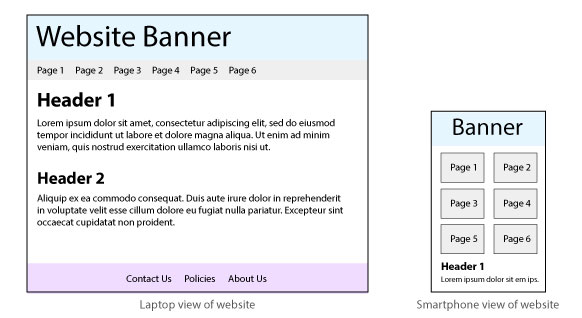
Some search engines have started penalizing websites that are not designed responsively for users on different machines and platforms to view the content. With the prevalence of smart phones as a means of connecting to the Internet, building a website that does not function well on a phone screen is a bad idea. And since smartphone users represent a high percentage of search engine users, search engines are going to be particularly concerned about the flexibility of your website.

Think you got it?
Use the activity below to review the concepts you've just learned. Match each word or phrase with its description and then check your answers to see how well you understand information architecture.
