Help students sort items into the correct category with the flexible Sorting Game Interactive. Compatible with text, images, and audio, this interactive has multiple layouts and customizable feedback.
Sorting Game is available in both audio and non-audio formats.
Sorting Game Sample
Sorting Game Sample Formatting
Complete the interactive above. Then, study the sample formatting below to see how it was authored.
[insert Sorting Game interactive]
[Question 1 – Stacked Layout]
Question: What type of number is shown
here? Drag-and-drop the number into the correct
category.
Drop Source: 𝜋
Drop Target 1: Rational number
Drop Target 2: Whole number
*Drop Target 3: Irrational number
Correct feedback: That’s right! 𝜋 is an
irrational number.
Incorrect feedback: Incorrect, 𝜋 is an
irrational number.
[END Question 1]
[Question 2 – Horizontal Layout]
Question: What country does this flag
belong to?
Drop Source: Shutterstock image
1777216208

*Drop Target 1: Greenland
Drop Target 2: Iceland
Drop Target 3: Denmark
Correct feedback: You got it! The flag
of Greenland is a red and white circle on a striped
background.
Incorrect feedback: Incorrect! The
Greenland flag is red and white and has a large circle.
[END Question 2]
[Question 3 – Custom Layout]
Question: What automotive system does
this part belong to?
Drop Source: Shutterstock image
2273927739
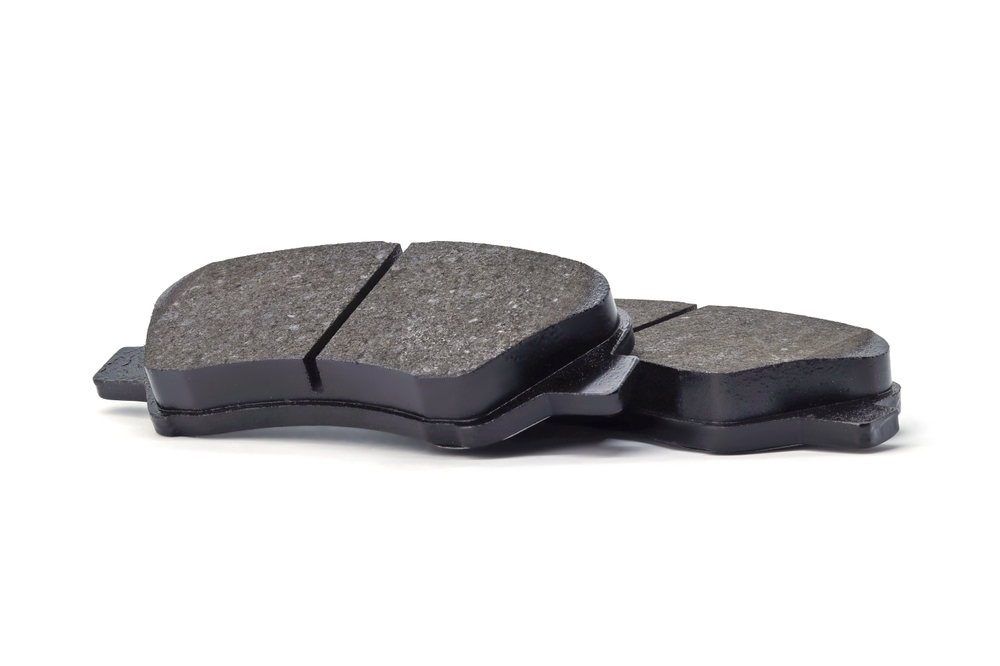
*Drop Target 1: Brake
Drop Target 2: Cooling
Drop Target 3: Transmission
Drop Target 4: Suspension
Correct feedback: You got it! These are
brake pads, which press against the rotor to slow the
car.
Incorrect feedback: Incorrect. These
are brake pads, which use friction to slow the car.
[END Question 3]
[END Sorting Game interactive]
Customizable Content:
- Question Text & Question Audio
- Drop Source Image, Text & Audio
- Drop Target Image, Text & Audio
- Feedback text
- Question layout
Constraints:
- 1-5 questions per game.
- One drop source per question.
- 3 drop targets for “stacked” and “horizontal” layouts.
- 4 drop targets for “custom” layout.
Formatting Template
To use the Sorting Game Secondary interactive, copy and paste the text shown below, and replace the placeholder text with your own.
[insert Sorting Game interactive]
[Question 1 – Stacked Layout]
Question: INSERT QUESTION TEXT HERE
Drop Source:INSERT DROP SOURCE IMAGE
and/or TEXT HERE
*Drop Target 1: INSERT DROP TARGET
IMAGE and/or TEXT HERE
Drop Target 2: INSERT DROP TARGET IMAGE
and/or TEXT HERE
Drop Target 3: INSERT DROP TARGET IMAGE
and/or TEXT HERE
Correct feedback: INSERT CORRECT
FEEDBACK HERE.
Incorrect feedback: INSERT INCORRECT
FEEDBACK HERE.
[END Question 1]
[Question 2 – Horizontal Layout]
Question: INSERT QUESTION TEXT HERE
Drop Source:INSERT DROP SOURCE IMAGE
and/or TEXT HERE
*Drop Target 1: INSERT DROP TARGET
IMAGE and/or TEXT HERE
Drop Target 2: INSERT DROP TARGET IMAGE
and/or TEXT HERE
Drop Target 3: INSERT DROP TARGET IMAGE
and/or TEXT HERE
Correct feedback: INSERT CORRECT
FEEDBACK HERE.
Incorrect feedback: INSERT INCORRECT
FEEDBACK HERE.
[END Question 2]
[Question 3 – Custom Layout]
Question: INSERT QUESTION TEXT HERE
Drop Source:INSERT DROP SOURCE IMAGE
and/or TEXT HERE
*Drop Target 1: INSERT DROP TARGET
IMAGE and/or TEXT HERE
Drop Target 2: INSERT DROP TARGET IMAGE
and/or TEXT HERE
Drop Target 3: INSERT DROP TARGET IMAGE
and/or TEXT HERE
Drop Target 4: INSERT DROP TARGET IMAGE
and/or TEXT HERE
Correct feedback: INSERT CORRECT
FEEDBACK HERE.
Incorrect feedback: INSERT INCORRECT
FEEDBACK HERE.
[END Question 3]
[END Sorting Game interactive]
Note: * marks the correct answer.
