In this lesson you should have learned a few new strategies for analyzing the effects of specific words in poems. It's important to take this knowledge with you as you read poems more independently—in this class, in high school, and beyond. (You may even find that looking out for multiple—meaning words can make you a sharper audience for advertisements, movies, songs, and television shows.)
Examine the use of multiple-meaning words in these poems from the anthology Poetry Speaks Who I AM. As you read, pay close attention to the words that each poet has chosen. Does the poem include words that can mean more than one thing? Does it use words that evoke emotions or call images to mind? Then answer the question about the poet's word choice and how it affects your reading experience.
"Dreams" appears on page 57 in the anthology. Its author, Langston Hughes, needs only about 30 carefully chosen words to convey the poem's central theme.
Many readers have described this poem's theme this way: People's dreams for their lives are so essential that without them, life seems to lack meaning. What multiple-meaning words in the poem support this interpretation?
Question
The word fast in this context means "tight," but it may also make readers think about how quickly life passes. It suggests that people need to pursue their dreams sooner rather than later.
Barren refers to a field that's not producing any crops, but it also suggests a couple that want to have a child but cannot. Both lines suggest that life without dreams is something to grieve.
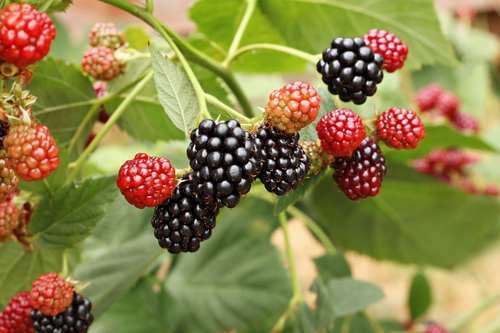
Seamus Heaney’s "Blackberry-Picking," on page 58, recalls the all-too-brief time in summer when blackberries are ripe for picking.
Question
Readers often notice the sense of regret the speaker conveys in the poem’s closing lines as he recalls the short-lived joy of berry-picking. What multiple-meaning words that help readers catch the contrast between joys that don’t last and regrets that do?
The speaker fondly recalls the sweet taste of "summer's blood" in the ripe berries. The "blood" is actually the ripe berries' juice, but the word blood has many associations, not all good. Things that bleed may die. This meaning sets up the turn toward regret in the second half of the poem, when the picked berries start to rot. The speaker says he always hoped the berries would "keep," which means "stay fresh" but also suggests that he wanted to "hoard" them. Perhaps the berries suggest that the sweet things of life can't be kept. They must be enjoyed in the moment and let go.
On page 69, Calvin Forbes's "A Small Poem" includes what you might call a "circle of life" discussion.
Question
This poem is cleverly addresses the universal theme that life is a circle connecting generations. What are some multiple—meaning words that help readers understand how a father's life intertwines with a son's?
The father names the son "shade" because "shade is cool"—literally, because temperatures are lower in shade than in the sunshine, and figuratively, because Shade is a "cool" name. This kind of wordplay is all through the brief poem. "To grow up," as plants and people do, is how the son will become "a grown-up," and while the "seed" that is the son has promise, there's also the chance that the man he grows into will be "seedy"—shabby and untrustworthy. The father seems to know this and wants to teach the son "why/what’s going / down."
Text
Guided Notes
Tutor
Video
How To
Meet your new study partner! With our powerful Student Tools, your online learning experience just got more accessible,
personalized, and thought-provoking than ever before!
Do you feel like you learn better when you watch videos? You’re not alone!
Research shows instructional videos can make learners more engaged and active in online classes,
when compared to text-only lessons.
Student Tools lets you turn some lesson pages into videos instantly! Just click the Student Tools tab and select Video.
Remember, video instruction is not available on every lesson page.
Go back to the lesson page any time by closing the Student Tools window.
Sometimes when you learn, it can feel like you’re just not getting it. Maybe you don’t really know what all the words on
the page mean, or you have to read a paragraph two or three times to understand what it’s about.
If this happens to you, just click the Student Tools tab and choose “Text.” This will automatically
simplify the instruction, making it easier to understand and remember.
Go back to the lesson page any time by closing the Student Tools window.
The science is in, and taking notes is one of the best ways to reinforce your learning.
Notes work even better when you write them by hand, since you’re more likely to put complex new ideas
in your own words and remember them longer.
You can quickly and easily access guided notes, as well as key lesson vocabulary,
by clicking Student Tools > Notes. Choose a PDF or Word Doc,
and fill them out online -- or even better-- print them out and take notes by hand!
Go back to the lesson page any time by closing the Student Tools window.
Imagine a teacher you can contact anytime, who is happy to answer all your questions and
knows pretty much everything in the world about the subject you need help with.
Say, “Hello!” to your Tutor! Click on Student Tools > Tutor, and ask any question about your class.
Your Tutor is super smart! You can ask the Tutor to explain things more clearly, make connections
between ideas, or even give you custom quizzes and feedback. You can click the links under References to learn more.
Go back to the lesson page any time by closing the Student Tools window.
Student Tools lets you create your own Flashcard decks to help you study. To get started, click Student Tools >
Flashcards. Press Add New Set and give it a title.
Now, decide what will be on the front and back of your first card. It can be a term and definition, a challenging question,
or even a funny phrase that helps you remember something. Click Add Card to Set to make a new Flashcard.
You can delete sets or cards by clicking the trash can icon. When you’re done, click Save Cards to Set.
Now you can Review your deck. Read the front of the card, and think of the answer. Even better, say your answer out loud! Then, click the card to flip it over.
Depending on how you did, you can either keep that card in the deck to study again by clicking Next or Previous, or if you got it right, click remove.
Remember to review your flashcards often, space out study sessions, and keep practicing until you know them all!
Go back to the lesson page any time by closing the Student Tools window.